Media kit
Everything you need to list Continuity1
Copy written at the lengths directories actually ask for, logos, and proof numbers with their sources attached. Take what you need, no permission required. Anything marked coming soon is genuinely not ready yet rather than hidden.
Filling a form programmatically? The same content is served as JSON at /media-kit.json.
At a glance
- Name
- Continuity1
- Category
- Talent acquisition
- Website
- https://www.continuity1.com
- Contact
- [email protected]
Descriptions
Each one is written for its own limit rather than trimmed down from the longest, so pick the one that fits the field instead of cutting.
The talent acquisition function for growing companies.
Continuity1 calibrates a role before anyone sources against it, then screens every candidate against that role rather than against their resume.
Also usable as the meta description.
Continuity1 is the talent acquisition function for growing companies. Each role is calibrated into a success profile before sourcing starts, candidates are screened on more than 40 signals and verified by real recruiters, and every recommendation arrives with the evidence behind it.
Continuity1 is the talent acquisition function for growing companies: the system, the process and the operators who run it. Most hiring fails long before anyone interviews. A role gets written down in terms nobody can screen against, so the sifting moves into the interview loop, the shortlist gets built on resume keywords, and the person who interviews most confidently wins. The result is a hire everybody approved and nobody is happy with six months later. Continuity1 starts by calibrating the role. Every brief becomes a success profile before sourcing begins. Candidates are then screened against that profile rather than against their resume, on more than 40 signals, and verified by real recruiters on a call. What reaches the client is a scored recommendation with its evidence attached: the AI scores, the recruiter notes and the call recordings. The client stays in the portal and makes the final call. Gateway is the self-serve side of the same system. A team can open a role, write screening questions, publish it with labelled apply links, and run the whole pipeline themselves. It works three ways: in the browser, through an AI assistant over the Model Context Protocol, and from the Gateway Scout extension while looking at a candidate on any professional site.
Continuity1 is the talent acquisition function for growing companies. Every role is calibrated into a success profile before sourcing starts, every candidate is scored against the role rather than the resume, and every recommendation is delivered with the evidence behind it. Its self-serve product, Gateway, runs the same pipeline from a browser, an AI assistant over MCP, or the Gateway Scout browser extension.
Features
Copy the heading on its own for a field that wants a bullet, or the sentence under it for one with room to explain.
- Every role is calibrated first
- Each brief becomes a success profile before anyone sources against it, so a shortlist can be defended rather than explained after the fact.
- Screened against the role, not the resume
- Candidates are assessed on more than 40 signals and verified by a real recruiter on a call, against the profile the role was calibrated into.
- Every recommendation carries its evidence
- AI scores, recruiter notes and call recordings arrive attached to the candidate, so any decision can be traced back to what it rested on.
- Your team makes every final call
- The hiring team stays in the portal. Everyone sees the same queue and the same dossier, and every action is stamped with who took it.
- Works where your team already is
- The same pipeline runs in the browser, from an AI assistant over the Model Context Protocol, or from the Scout extension while you are on a candidate page.
Products
Three separate listings. A SaaS directory, an MCP registry and an extension store want different fields, so each has its own copy below.
Continuity1 Gateway
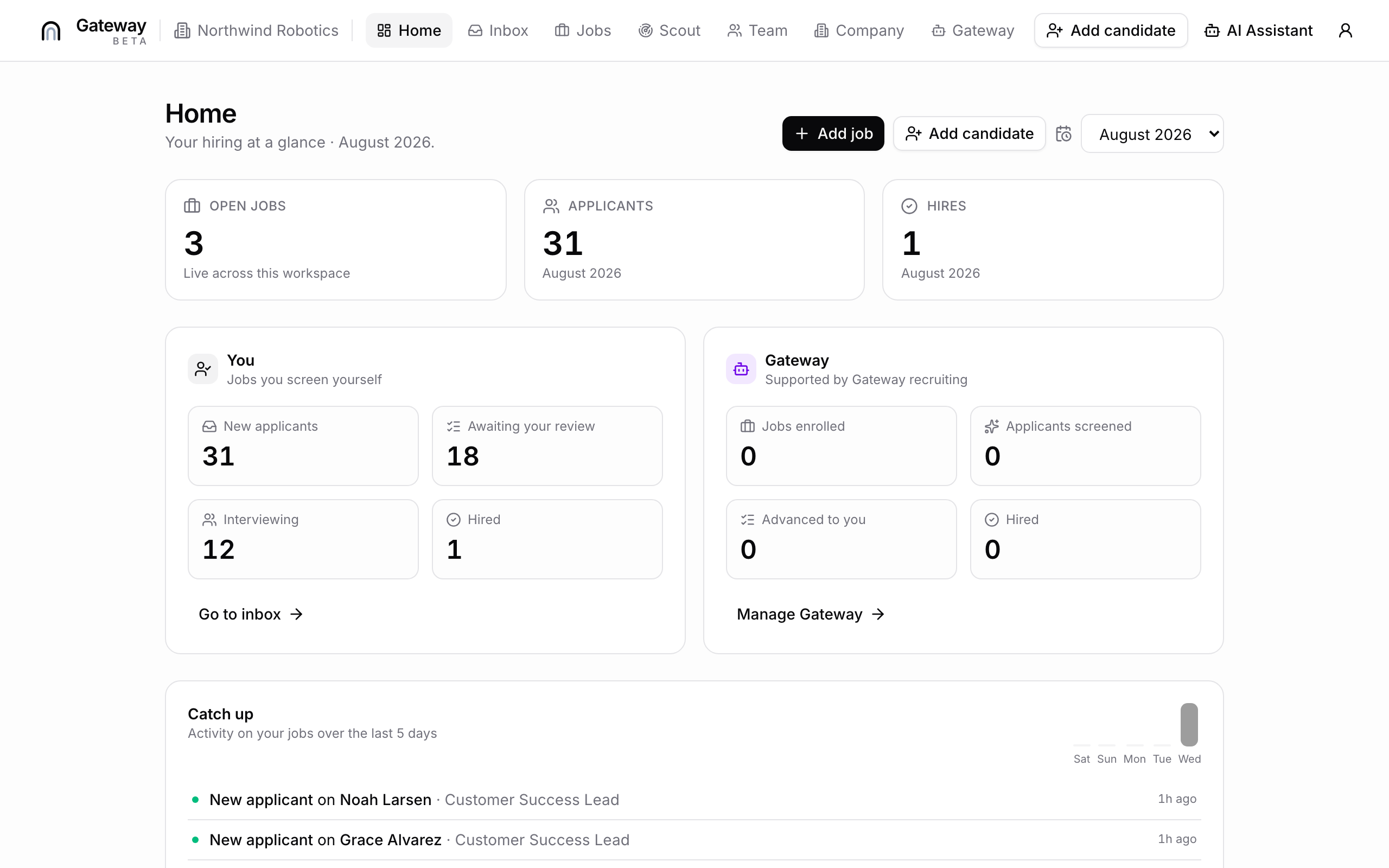
Web application liveOpen a role, screen applicants against it, and run the pipeline with your team.
URL https://gateway.continuity1.com/app/g/signup
Hiring your own team can actually run.
Open a role, set the screening questions, publish it with labelled apply links, and run every applicant through one pipeline with your team.
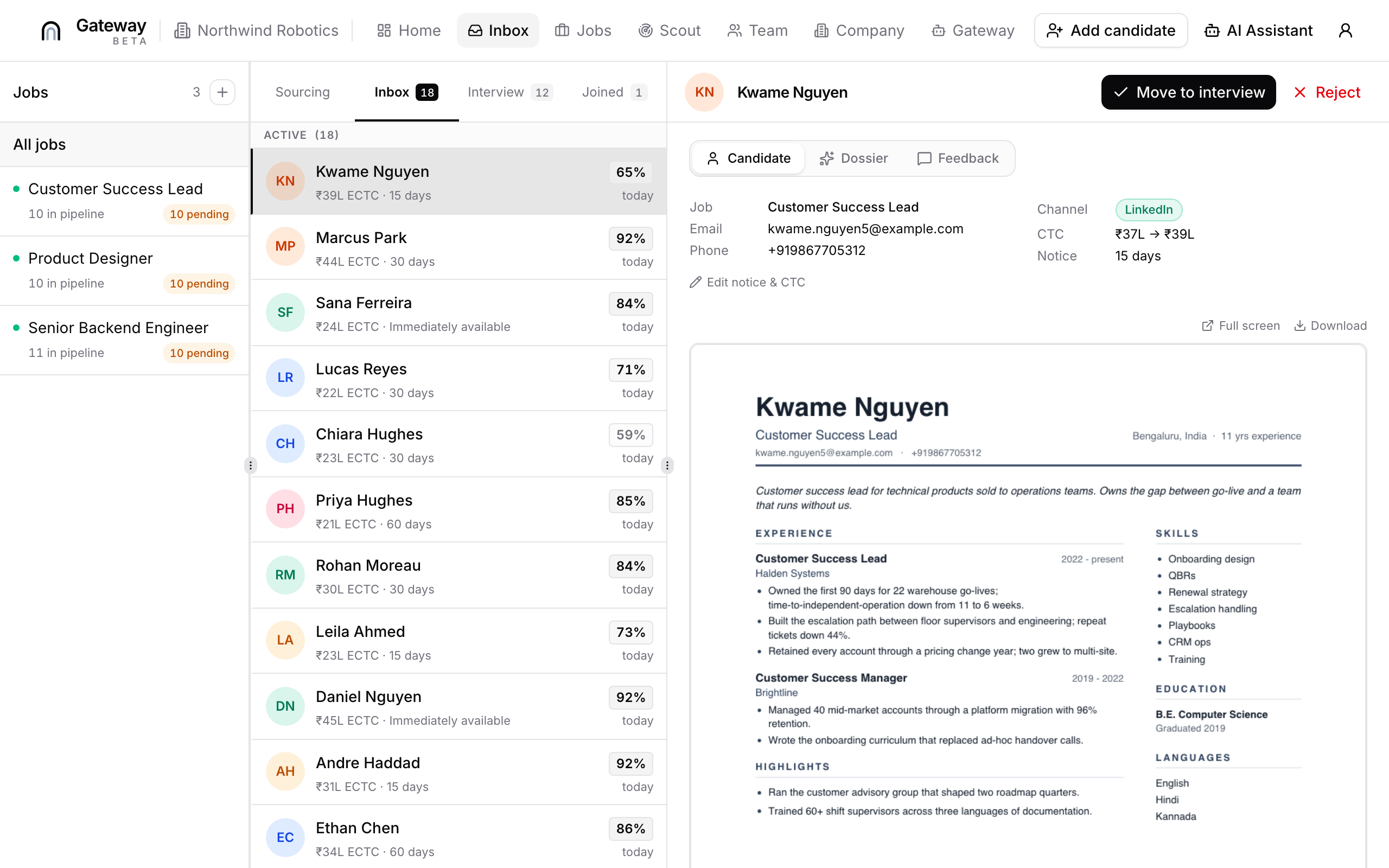
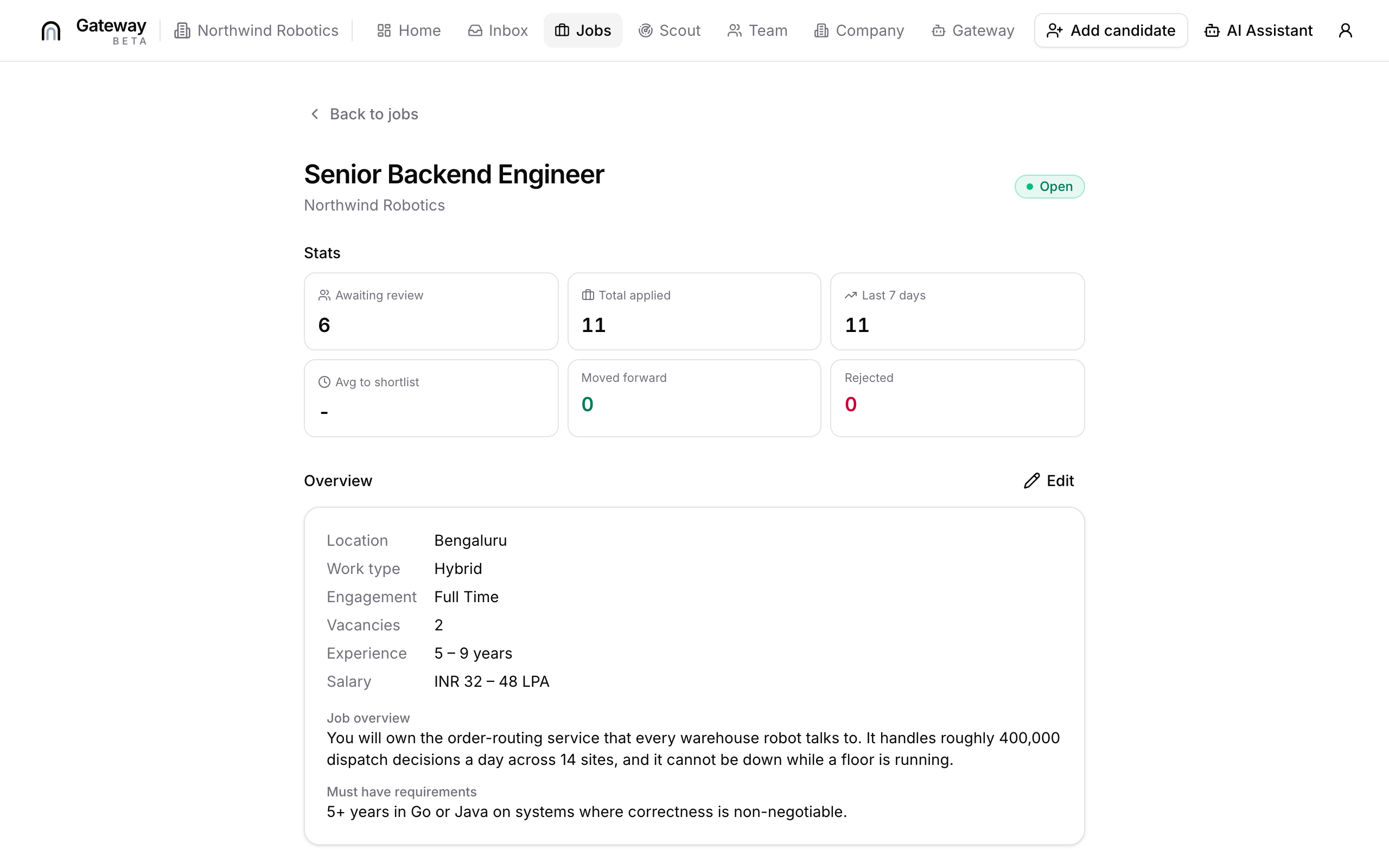
Gateway is the self-serve side of Continuity1. Create a role and write its description, add screening questions and an evaluation guide for whoever reviews, then publish it and generate up to five labelled apply links so you can tell which channel each applicant came through. Applicants land in one inbox. Your team reads the full timeline on a candidate, leaves feedback the rest of the panel can see, moves them between stages, and records decisions against structured reasons rather than free text. Panel members are added per role, so the people reviewing a job are the people who should be. The same actions are available three ways: in the browser, from an AI assistant over the Model Context Protocol, and from the Gateway Scout extension while you are on a candidate page. A job can be paused, reopened or closed as the role changes.
Feature bullets
- Roles carry a full description, screening questions and an evaluation guide for reviewers
- Up to five labelled apply links per role, so you know which channel each applicant came from
- One inbox for applicants, with a per-candidate timeline
- Panel members added per role; feedback is shared, not siloed
- Decisions recorded against structured reasons, not free text
- Draft, publish, pause, reopen and close as the role changes
- Per-role stats, a dashboard and an activity feed
- Same actions available in the browser, over MCP, or from the Scout extension
Categories
- Recruiting
- Applicant tracking
- HR software
- Hiring
- Collaboration
Continuity1 Gateway MCP Server
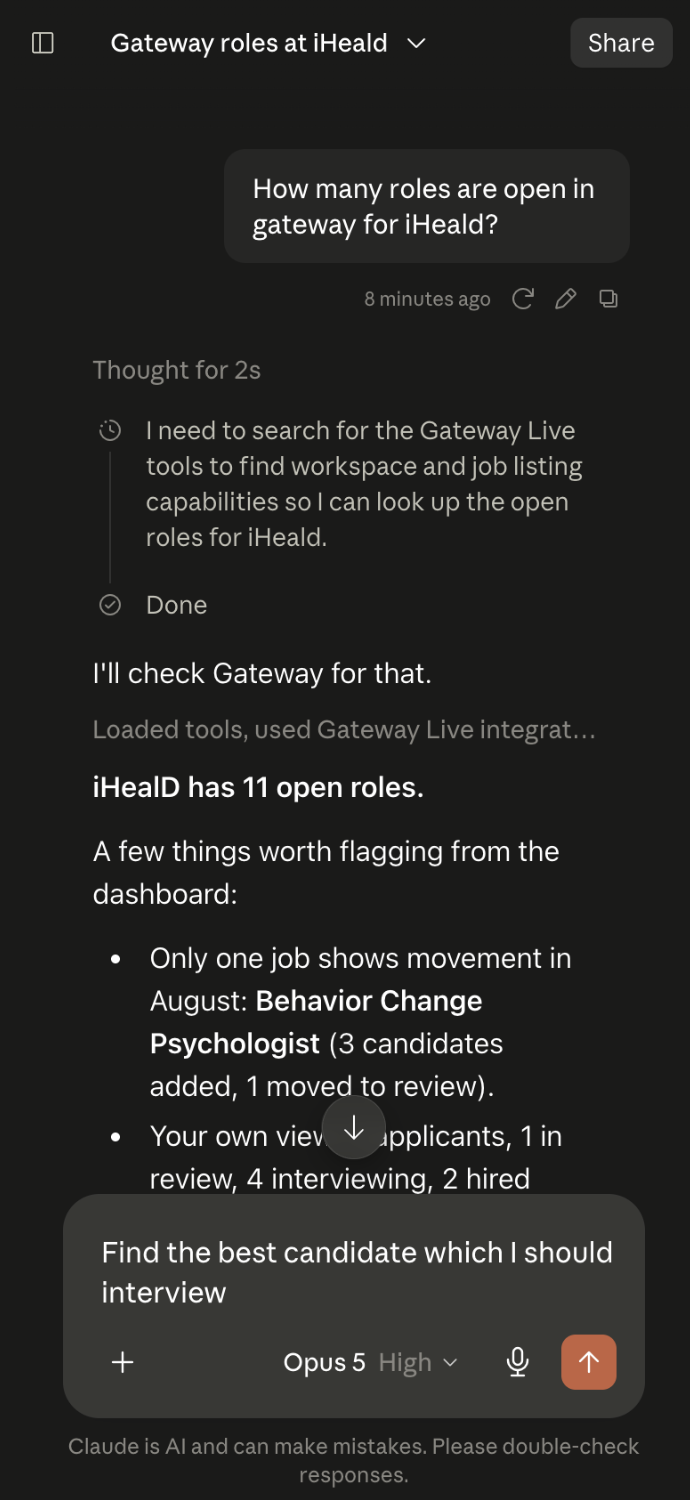
MCP server liveRun the whole hiring pipeline from any MCP client. 49 tools, OAuth, no API key.
URL https://gateway.continuity1.com/mcp
Run your hiring from your AI assistant.
Open roles, write screening questions, publish jobs and review candidates from any MCP client. 49 tools, OAuth sign-in, no API key to store.
The Gateway MCP server exposes hiring as tools an assistant can call directly. Ask it to open a role and it creates the job, writes the description candidates will read, adds screening questions, publishes it and hands back an apply link. Ask about a candidate and it reads the inbox, the timeline and the feedback your panel left. It covers 49 tools across jobs, screening, publishing, candidates, panel and team, split 19 read-only and 30 that write. Every tool declares which it is, so a client can tell you what a call will change before it runs. Sign-in is OAuth 2.1 with PKCE and dynamic client registration, so connecting is a browser login rather than an API key you have to store and rotate. Access is scoped: identity, jobs, candidates, team and support are granted separately.
Feature bullets
- 49 tools: 19 read-only, 30 that write, each annotated so clients can warn before a change
- OAuth 2.1 with PKCE and dynamic client registration, no API key to store
- Seven granular scopes across identity, jobs, candidates, team and support
- Create and edit roles, including the description candidates read
- Add screening questions and the evaluation guide reviewers see
- Publish roles and manage labelled apply links
- Read the inbox, candidate timelines and panel feedback; move stages and record decisions
- Invite teammates, set roles and manage the panel on a job
- Every result returns a URL you can open in the browser to carry on there
Tools exposed (49)
whoami, list_workspaces, get_team, get_company, update_company, list_jobs, list_closed_jobs, get_job, get_job_stats, create_job, edit_job, publish_job, pause_job, reopen_job, close_job, delete_draft_job, list_review_reasons, list_screening_questions, add_screening_question, update_screening_question, remove_screening_question, set_screening_guide, list_publish_links, create_publish_link, rename_publish_link, remove_publish_link, update_publish_settings, list_inbox, get_candidate, get_candidate_timeline, mark_candidate_viewed, set_candidate_stage, decide_candidate, list_rejection_reasons, leave_candidate_feedback, list_candidate_feedback, update_candidate_details, invite_teammate, update_teammate_roles, remove_teammate, resend_teammate_invite, get_panel, add_panel_member, remove_panel_member, get_dashboard, get_activity, submit_support_request, refer_lead, request_gateway
Categories
- MCP server
- Recruiting
- Hiring
- Productivity
- HR
Gateway Scout
Chrome extension liveScout candidates from any professional page, scored against your open role.
Scout candidates from any page you are on.
A side panel that reads the page you are on, surfaces the candidate profiles on it, scores them against your open role and drafts the outreach.
Gateway Scout is a side panel for hiring teams. Pick one of your open roles, click Scout this page, and it reads what is on screen, identifies the publicly listed profiles there and scores each one against that role. It works anywhere people publish their work rather than on one network: professional networks, code hosts, design portfolios, community directories, personal sites. Find scouting avenues turns a role into openable searches to run next. On a scored candidate, Draft message writes the outreach note. It reads the page only when you click, and acts as your already signed-in Gateway account rather than asking for a separate password.
Feature bullets
- Scores profiles on the page against a specific open role, not in the abstract
- Works on any professional site, not a fixed list of networks
- Find scouting avenues turns a role into searches to run next
- Drafts the outreach message for a scored candidate
- Reads the page only on an explicit click
- Uses your existing Gateway sign-in, no separate password
- Side panel, so it sits next to the page rather than covering it
Categories
- Browser extension
- Sourcing
- Recruiting
- Productivity
Assets
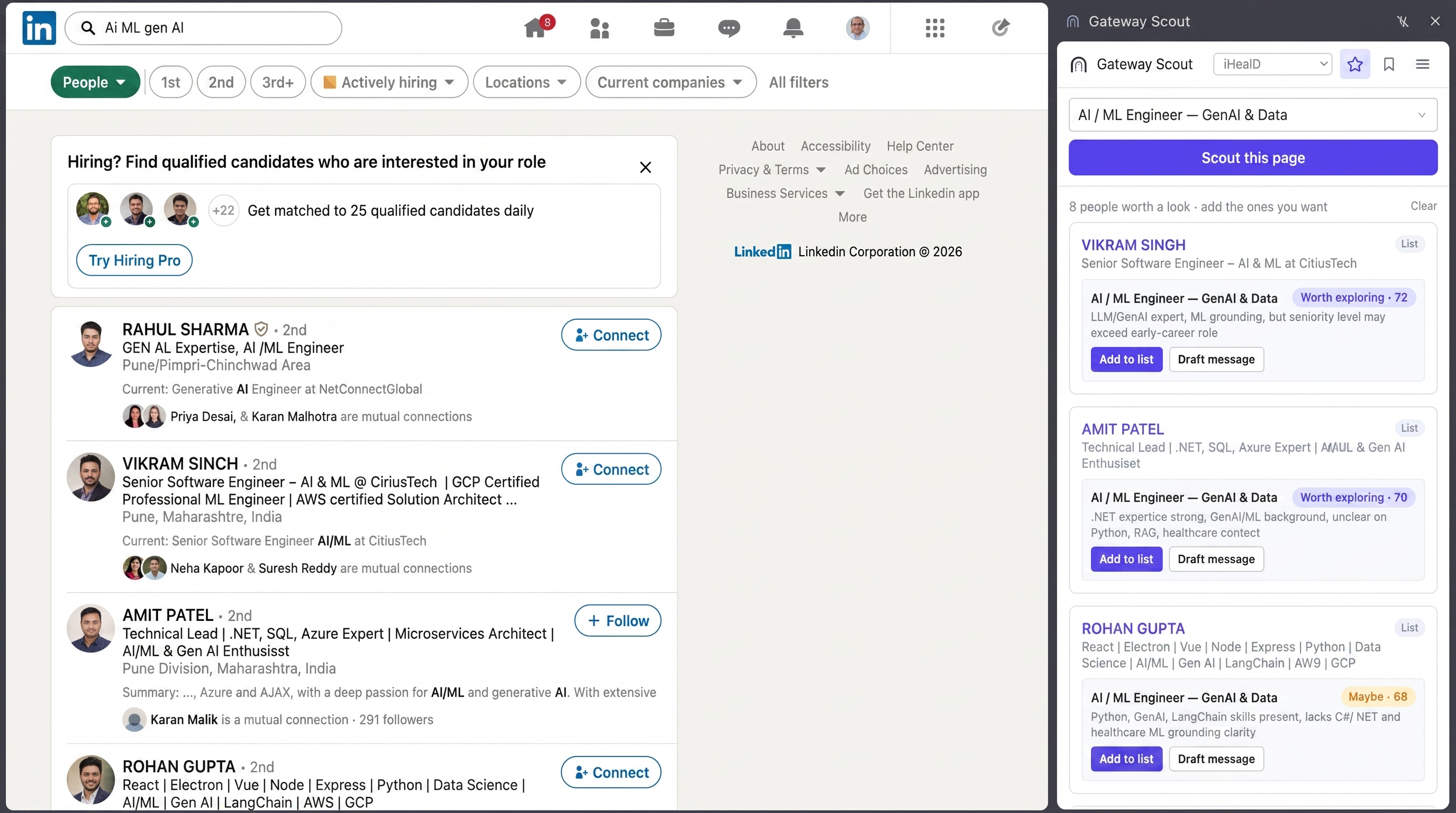
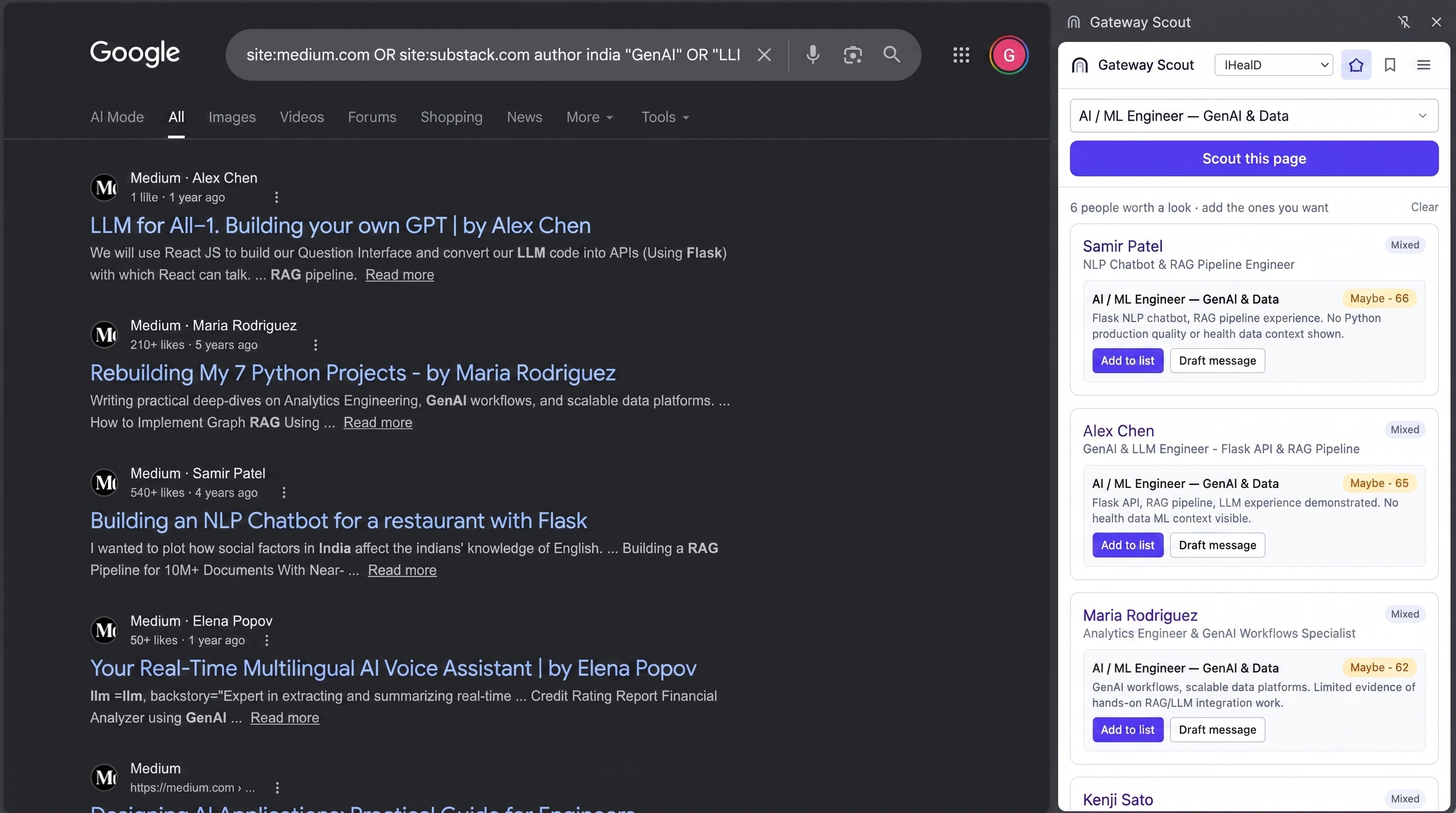
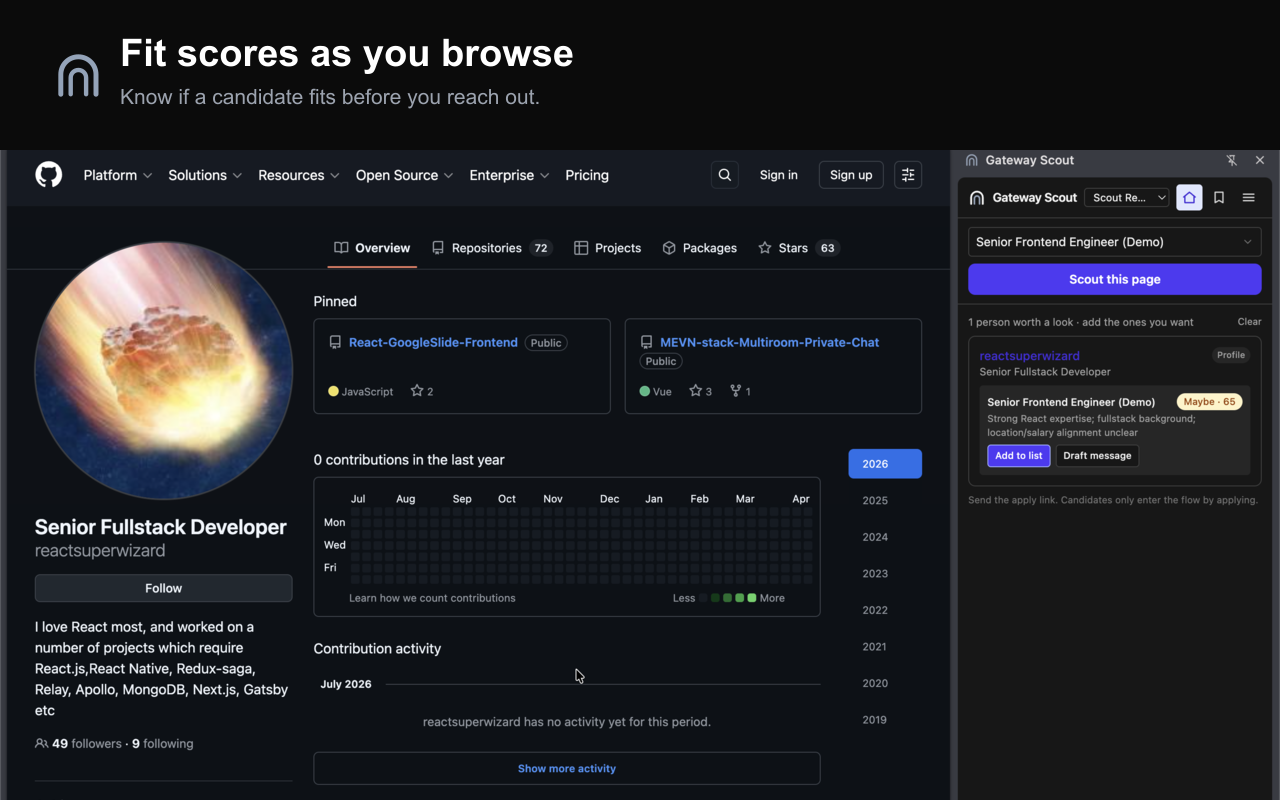
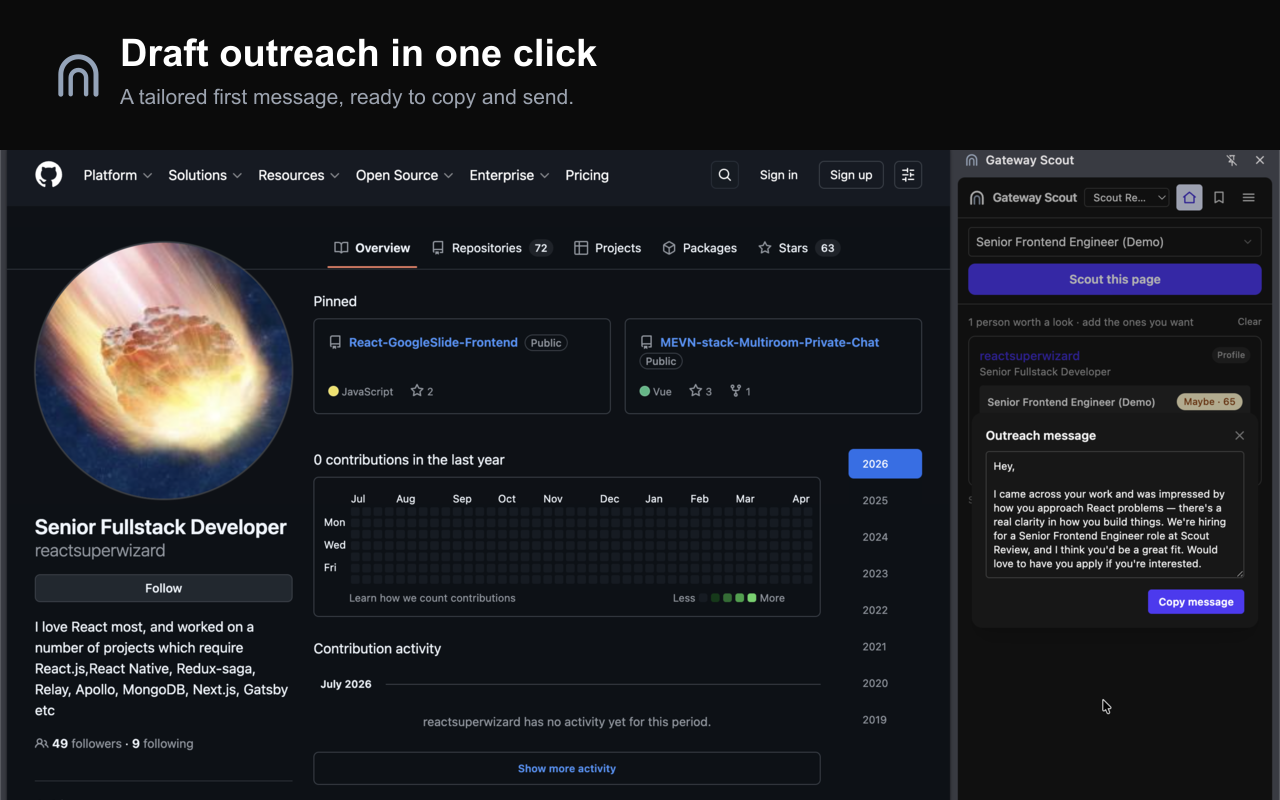

- Store promo tiles Coming soon
- Chrome Web Store listing Coming soon
Proof numbers
Each one carries the market benchmark it should be compared against, quoted from the study rather than paraphrased. If you need a figure that is not here, ask rather than infer one.
Aligned engagements run nearer 1 in 2, distant ones nearer 1 in 10. The market takes about 180 applicants to make one hire, and that sifting lands on your team rather than ours.
"In 2024, employers received an average of 180 applicants for every hire they made."
Our figure: Continuity1 tracked engagements
Indian employers report nearly 4 in 10 offers dropped. We lose 1 in 9.
"About 37% of offered candidates drop the offer, and two-thirds of them do that just before or on the date of joining."
Our figure: nasscom community
Agencies target 3 to 5 business days and often take weeks.
Our figure: Continuity1 tracked engagements
Ashby puts technical roles at 17.6 interviews per hire across the whole process, up 52% since 2021. The rest of that load sits with the function, not with you.
"Technical roles require more, averaging 17.6 interviews per hire, a 52% increase from 2021."
Our figure: Ashby talent-trends report
Logos and assets


Colours
The two things worth getting right: the accent, and which wordmark to use on a dark tile.
- #0D1424 Text and the wordmark on light backgrounds
- #7C3AED The single accent. Do not substitute another purple.
- #FCFCFD Page background
Contact
Anything missing, or you need an asset in a size that is not here: [email protected]