Screen applicants by resume, in writing and by voice.
Three AI screens in one place, each scored against your role: a resume match for everyone who applies, then a timed written evaluation and a voice interview for the ones who clear your bar. Use one, two or all three.
01 · Resume screening
AI resume screening against your role.
Gateway reads each resume, or CV, against the role you are hiring for and gives it a match score from 0 to 100, whatever words the resume uses for the work. Before that, your screening questions and exclusion criteria run on every application.
- Screening questions, Yes or No or written, each with the answer you prefer, scored at one of four strictness levels.
- Exclusion criteria in plain words, acting only on facts the CV states outright, never on where someone is from.
- The role’s salary maximum and experience minimum, and duplicates caught on arrival.
- Every applicant who stops is recorded with the reason.
Exclusion criteria
No experience in a customer-facing role.
Screening questions
Have you owned renewals for a book of accounts?
Yes or No · preferred Yes
Walk us through the last renewal you saved.
Written · preferred: names the account, the risk and what they changed
Screening answers
Turned away, with the reason
Ana Ribeiro · Screening answers scored 38%, below this role’s 55% mark
Pre-screening questions worth asking.
A short set gets better answers. Ask first what rules a person out, then one or two questions that only someone who has done the work can answer well. Eight is plenty for most roles.
Must-have
Do you hold the licence this role requires?
Yes or No, preferred Yes
Location
The role is in Pune, three days a week in the office. Does that work for you?
Yes or No
Work rights
Are you eligible to work in India without a work permit?
Yes or No, preferred Yes
Shift or travel
The role covers a UK shift, 1 pm to 10 pm. Is that workable?
Yes or No
Notice
If you received an offer, how soon could you start?
Written
Pay
Our range for this role is ₹14 to 18 lakh. Is that in line with what you expect?
Written
Recent work
Describe the largest account you have owned in the last two years, and your part in it.
Written, preferred answer: names the account’s size and their own part
A real situation
A customer threatens to cancel over a missed delivery. What do you do in the first hour?
Written, preferred answer: the steps, in order
Write the preferred answer as what a good answer contains, such as “names the account’s size and their own part”. Gateway scores against it, so a specific answer scores higher than an enthusiastic one.
02 · Written screening
A timed written evaluation on the role’s own questions.
Applicants who clear your bar answer the role’s questions in writing, in one sitting on a laptop. Written answers show how a person reasons through the work, and each one comes back with its score.
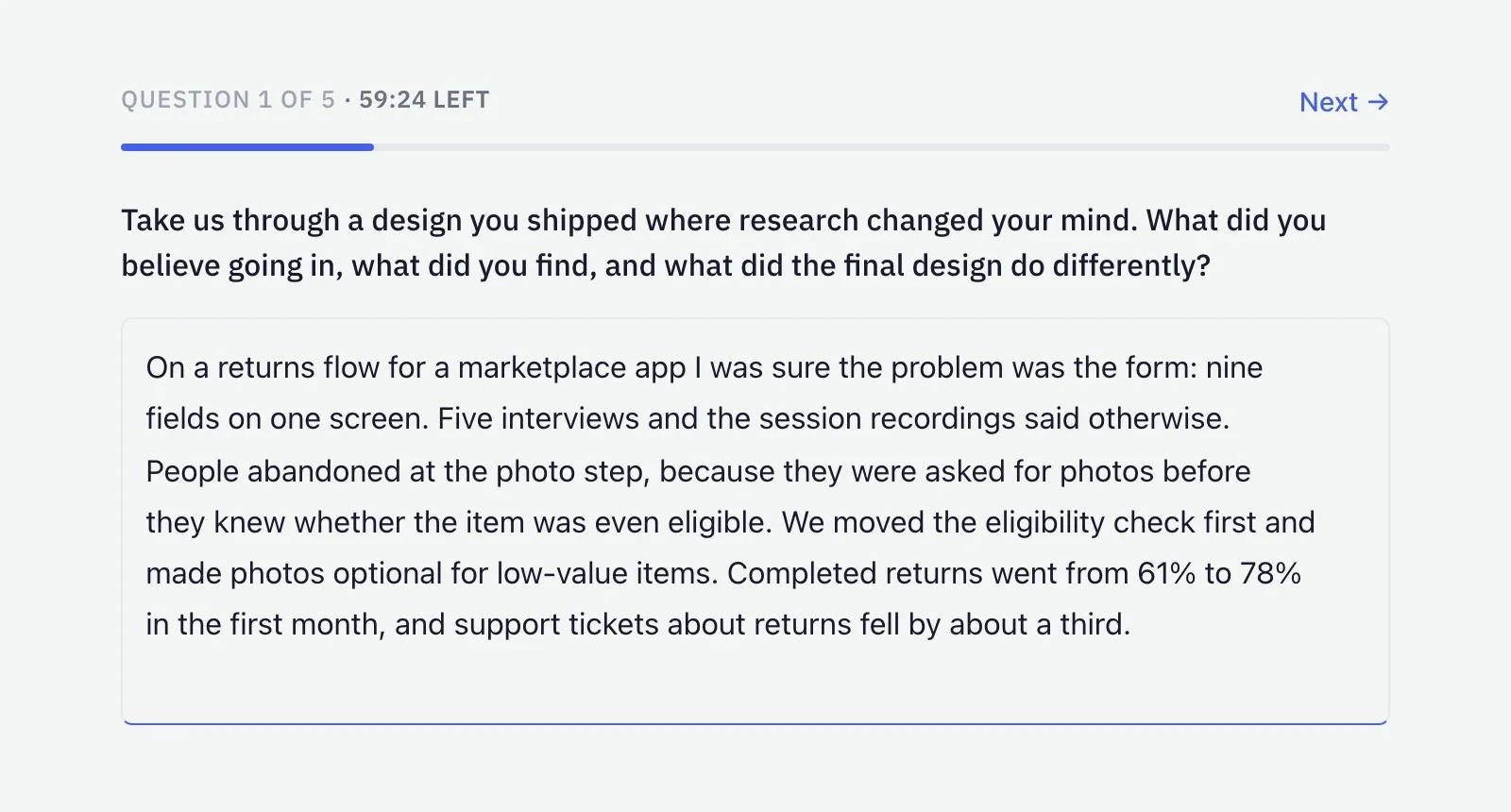
One timed sitting.
60 minutes unless you change it. The clock survives a reload, and time-up hands in what is written.
Pasting is blocked.
Answers are typed during the evaluation, and monitoring records how each was written, at the level you choose.
Your bar, set once.
Gateway suggests what a good answer covers; your hiring manager can review and change each one.
Each answer, scored for your team

03 · Voice screening
An AI voice interview on the same questions.
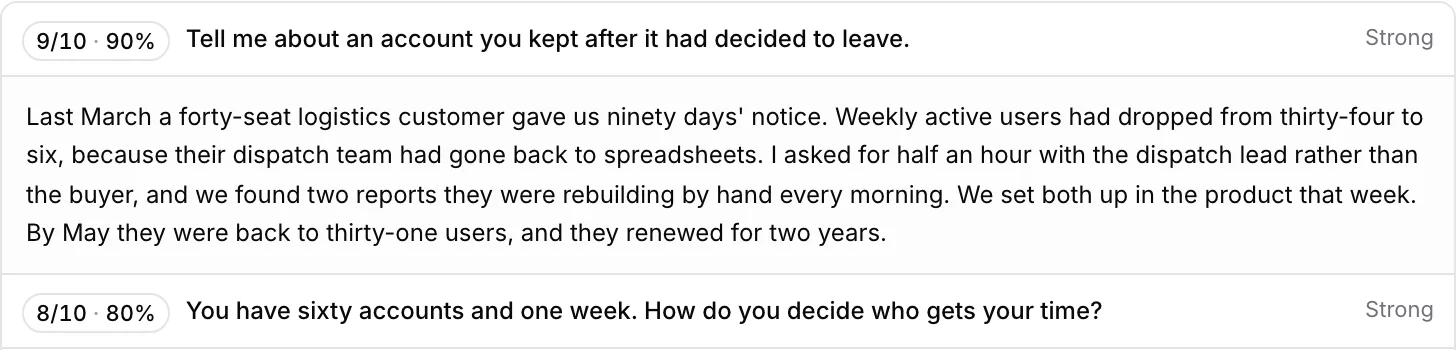
After the written evaluation, the candidate talks the same questions through with an AI interviewer, which follows up wherever an answer stays vague. Every answer is written out and scored, so your team reads the call instead of listening to it.
- Up to 15 minutes, in the browser on a laptop or desktop, from any country.
- Or as a phone call on an Indian mobile number: the candidate presses “Call me now”.
- The interviewer speaks English. In the browser, candidates may answer in English, Hindi or a mix.
The call, written out and scored
Then · one verdict
All three screens end in a verdict your hiring manager can act on.
Recommend, Caution, Skip or Inconclusive, with two scores out of 10: can they do this job, and will they keep showing up. It comes from what the candidate wrote and said, with their own words as evidence.
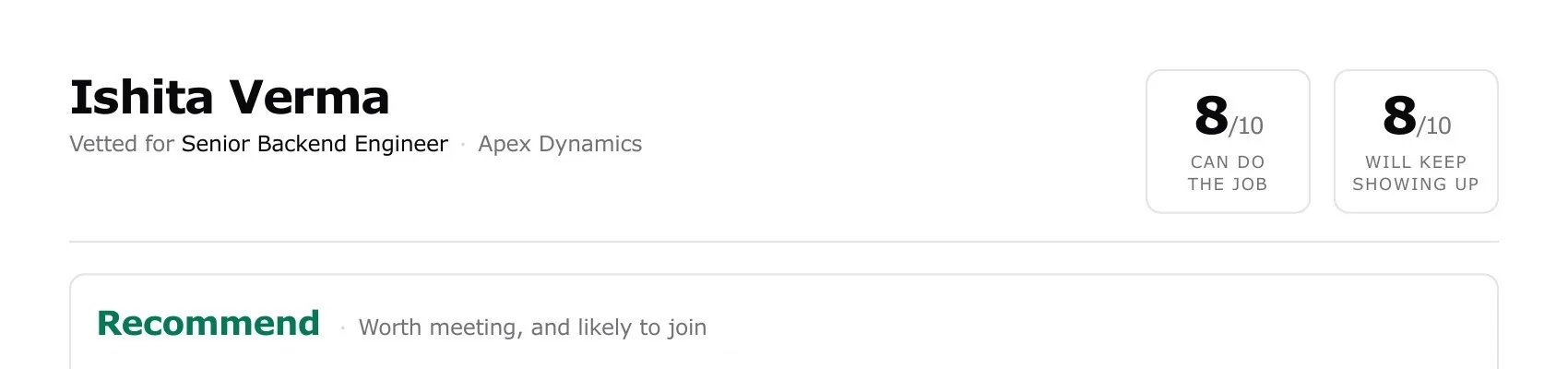
Read one page.
The verdict, two scores and the candidate’s words, instead of a recording.
Share it.
View only, with up to five people, for seven days.
The resume stays out.
It decides who is invited. The verdict is made from the written and voice answers.
Who moves forward, and who decides.
Switch a role to Automatic and applicants who arrive after that and score at or above your cutoff are invited to the written and voice screens on their own. Or send them yourself, to anyone on the role, including people you import from a spreadsheet.
Automatic
- A CV that matches your exclusion criteria.
- Screening answers below the strictness level you picked.
- Expected salary above the role’s maximum, or experience below its minimum.
- A duplicate application, or a file that is not a resume.
- A Skip verdict, which moves the applicant to Rejected.
Waits for your team
- Recommend and Caution, in your Inbox.
- Inconclusive, which stays where it is.
- Applicants below your cutoff, until you send them.
- Applicants already on the role when you switch Automatic on.
- Every interview, offer and hire.
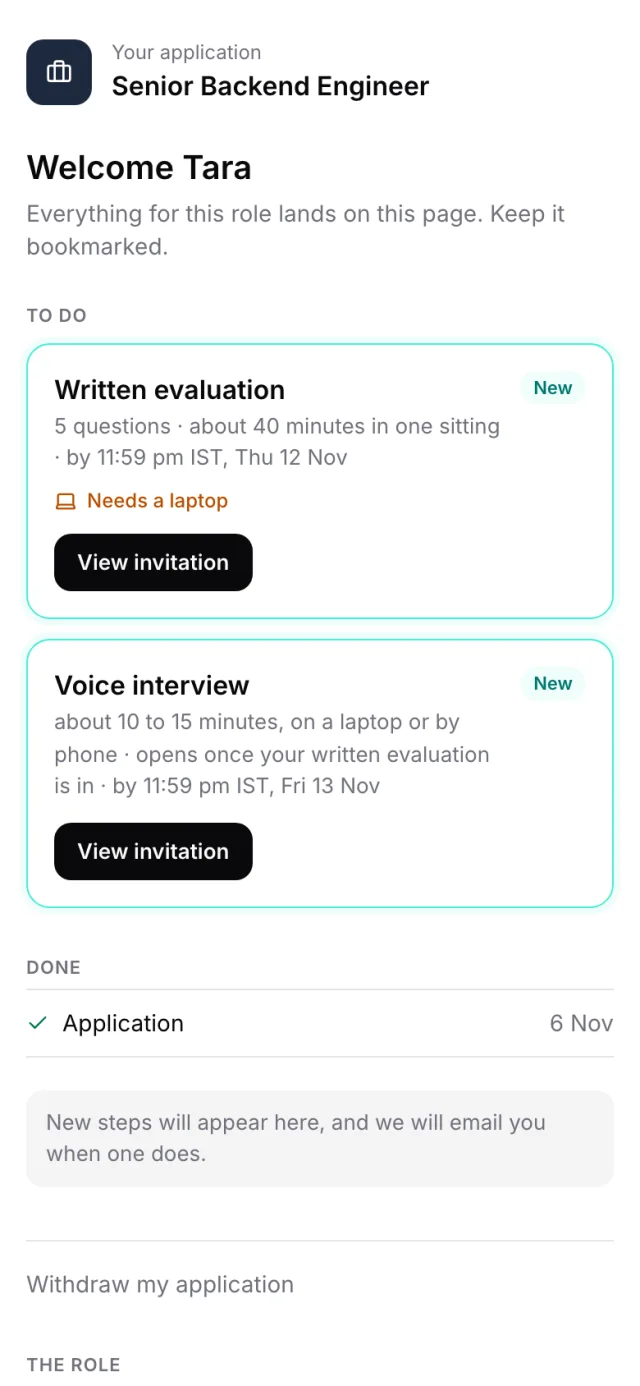
What candidates see.
One page for the role, with every step, how long it takes and its deadline. Candidates know what is coming before they start.
- Three days to respond, with reminders at 24, 48 and 66 hours that never arrive between 10 pm and 8 am their time.
- The written evaluation says up front that it needs a laptop and one sitting.
- The voice interview opens once the written evaluation is in. A candidate who cannot take the call can say so, and the written evaluation is judged on its own.
How to set up AI screening for a role.
Six steps, most of them a few minutes each. Screening works from the next application; the written and voice screens start once the role’s questions are ready.
Create the role.
Start from the job description. Set the salary maximum and the experience minimum if they rule people out.
Write the screening questions.
Yes or No for the hard requirements, one or two written questions about the work, and a strictness level.
Add exclusion criteria.
In plain words, the facts on a CV that rule someone out. Leave them empty if nothing does.
Switch on the resume match.
Every application through the role’s link gets a score from 0 to 100.
Switch on the written and voice screens.
Answer the role’s questions about what the job needs. Gateway prepares the evaluation for your hiring manager to review.
Choose who goes forward.
Automatic, from a cutoff you pick, or by hand from your Inbox. Then share the role’s apply link.
What to check before you choose an AI screening tool.
Most screening tools look alike in a demo. These questions show the difference in the first month, when real applicants arrive and your hiring manager starts reading the results.
Is every score measured against your role?
A generic profile ranks the same people first for every job. Gateway scores against the role’s own questions and the answers your hiring manager expects.
Can you see why each applicant stopped?
Ask to see one rejected applicant and the reason recorded for them, in plain words.
Is anything rejected that you did not set?
Hidden rules surprise you later. Ask for the full list of what the tool turns away on its own.
Does it go past what the candidate wrote?
A resume score sorts the pile; it says nothing about whether the person can do the work.
What does your hiring manager actually receive?
A score alone starts a debate. Look for a verdict with the candidate’s own words behind it.
How does it handle answers written with AI?
Polished answers are cheap now. Ask what the tool blocks, what it records, and who decides what it means.
What does the candidate go through?
Long or unclear steps lose good people. Ask to see the candidate’s side, start to finish.
Can you change the bar when your interviews disagree?
Every screen drifts from what the panel wants. In Gateway, the people your panel turns down at interview can recalibrate the questions, when you choose.
What comes with AI screening.
Resume screening
A match score from 0 to 100 for applicants through your role’s link, with screening questions and exclusion criteria.
Written screening
One timed sitting on a laptop, 60 minutes unless you change it, monitoring at Minimal to start.
Voice screening
The same questions aloud, up to 15 minutes, in the browser anywhere or by phone in India.
Who goes forward
Applicants at or above your cutoff, on their own, or anyone you send.
Candidate window
Three days, with reminders that never arrive at night.
Verdict
Recommend, Caution, Skip or Inconclusive, with two scores out of 10, shared view only with up to five people.
Recalibrate
From your panel’s interview decisions, when you choose.
Questions people ask about AI screening.
What is AI candidate screening?
Software that reads each application against the role and decides who moves forward. Gateway scores resumes and screening answers, then asks the applicants who clear your bar to write and talk through the role before a verdict.
How is AI resume screening different from a keyword filter?
A keyword filter looks for words. Gateway reads each resume against the role and gives it a match score from 0 to 100, so a resume that describes the work in other words still scores.
What screens an applicant out?
Only rules you set: your exclusion criteria, the strictness level for screening answers, and the role’s salary maximum and experience minimum. Duplicate applications and files that are not resumes are set aside too. Inside vetting, only a Skip verdict rejects.
What is the difference between screening and vetting?
Screening decides who is worth a closer look, from the application. Vetting is the closer look: a written evaluation and a voice interview, ending in a verdict on whether the person can do this job.
What is a pre-screening interview?
A short first check that an applicant meets the role’s basics before anyone spends interview time. In Gateway, screening questions on the application cover the basics, and the voice interview in vetting takes the place of a first call about the role itself.
Can we use screening without vetting, or vetting without screening?
Yes. Screening questions and the resume match work on their own, and vetting is switched on role by role. You can also send vetting by hand to people who never went through screening, such as candidates you import.
Does the AI make the hiring decision?
It makes one decision on its own: a Skip verdict moves the applicant to Rejected. Recommend, Caution and Inconclusive wait for your team, and the hire is always yours.
What does the hiring manager receive?
One page per candidate: the verdict, two scores out of 10 and the candidate’s own words behind them. You can share it, view only, with up to five people for seven days.
How is the bar set for each role?
Gateway prepares the role’s questions and suggests what a good answer covers. Your hiring manager can review and change each answer, in Gateway or from an emailed link, and every candidate on the role is judged against the same answers.
Is the resume used in the verdict?
No. The resume decides who is invited. The verdict is made from what the candidate wrote and said.
How long does a candidate have?
Three days from the invitation, with reminders at 24, 48 and 66 hours that never arrive between 10 pm and 8 am their time.
How long are the written evaluation and the voice interview?
The written evaluation is one timed sitting, 60 minutes unless you change it. The voice interview runs for up to 15 minutes.
Can candidates take the voice interview by phone?
Yes, on an Indian mobile number: the candidate presses “Call me now” and the call comes to them. Anyone, in any country, can take it in the browser on a laptop or desktop.
Which languages are supported?
The interviewer speaks English. In the browser, candidates may answer in English, Hindi or a mix of the two. The written evaluation is in English.
What if a candidate cannot take the call?
They say so on their page, and the written evaluation is judged on its own.
How do you stop candidates pasting AI-written answers?
Pasting into the written evaluation is blocked. Monitoring records how each answer was written, at the level you choose, so your team can read it and decide.
Can we vet someone below the cutoff, or someone we found ourselves?
Yes. Send vetting to anyone on the role, including people you import from a spreadsheet.
Are applicants already on the role vetted when we switch it on?
No. Automatic vetting takes applicants who arrive after you switch it on. Send earlier applicants by hand.
Does it work for non-technical roles?
Yes. The questions come from the role, so sales, customer support, operations and engineering roles each get their own.
Can we run screening from our AI assistant?
Yes. Gateway’s MCP connection lets Claude or ChatGPT import candidates, read your Inbox and move candidates on.
Does it connect to our ATS?
Gateway is an applicant tracking system itself. To bring candidates in from another system, import a spreadsheet of up to 1,000 people at a time, depending on your plan.
What happens when our interviews disagree with the verdicts?
Once your panel has turned down three people at interview within 90 days, you can recalibrate: the questions are rebuilt from those decisions, and candidates keep going meanwhile.
Put only screened people in front of your panel.
Switch on AI screening for a role you are hiring for now.
The rounds after screening, in the same account: Work assessments · Async interviews · Voice interviews